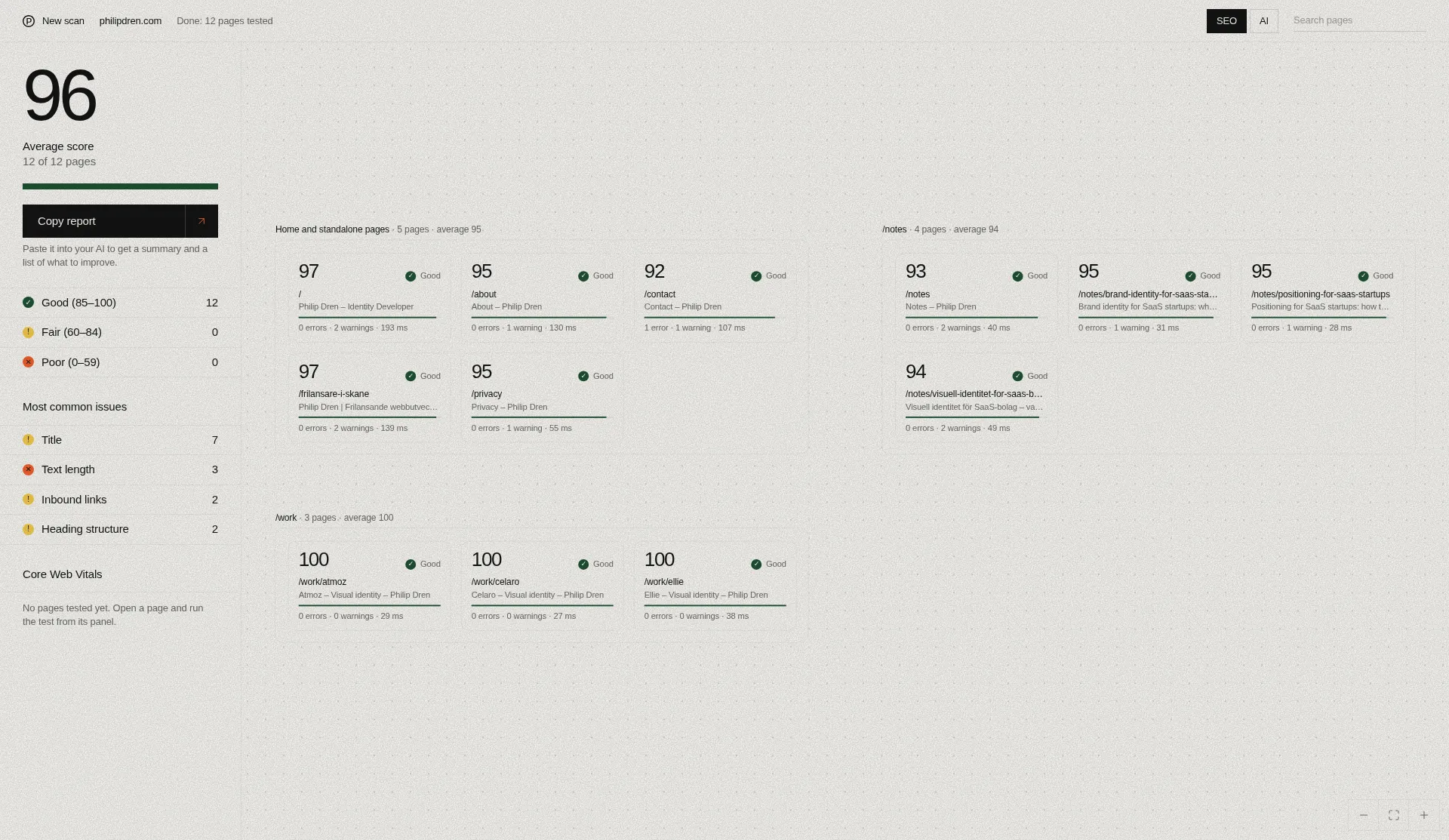
SEO Checker is a free tool that puts your site's pages on a single canvas, with SEO checks and a separate score for how well AI services can read each page. Here's a walkthrough of how it works, how to interpret the results, and how to get a prioritized list of improvements from the AI assistant you already use.
Today I'm releasing SEO Checker. The reason is simple: I wanted to build a free SEO tool that doesn't suck. You see the scanned pages on one canvas, and every issue comes with a simple explanation. The tool's limitations are summarized further down.
From URL to canvas
When you paste in an address, the tool reads the site's robots.txt and sitemap to find pages. If there's no sitemap, it starts from the links on the homepage. It then tests the first 50 pages. It also follows internal links to find pages that aren't in the sitemap.
The pages aren't all tested at once. Each page appears on the canvas as soon as it's done, so you can start looking while the rest finish. Once the first batch is complete, you can load 50 more, with a one-minute wait between batches. On a larger site, you build up the picture batch by batch. There's no guarantee that every page will be found, and everything you see applies only to the pages that have actually been scanned.
Reading the canvas
Every tested page becomes a card, colored by its score. You can zoom, pan, search for a page, and filter by a specific issue or by score band: Good (85–100), Fair (60–84) and Poor (0–59). The side panel shows the average score and the most common issues.
The side panel is a good place to start. An issue that shows up on many pages may share a single cause, such as a template those pages use. In that case one change can fix it in many places at once.
Click a card to see the details: score, title, meta description, Open Graph image preview, response time, word count and inbound links. Issues are listed first and passed checks after them, and each item has a simple explanation.
The scores are the tool's own weighted scores, not an SEO score from Google. They help you sort and compare, but they aren't the goal in themselves. Here's a hypothetical example: say several pages are missing a meta description, while one important page has an indexing problem. The important page may be the one worth fixing first. Read the issues, not just the numbers.
Beyond the per-page checks, the tool also looks at the site as a whole: duplicate titles and descriptions, broken internal and external links, links that go through redirects, pages missing from the sitemap, orphan pages and click depth. Here too, the results only cover the pages scanned so far.
AI readability is not AI visibility
Next to the SEO score, every page gets a separate AI readiness score. It measures how well AI services can read the page. It says nothing about whether AI services show, cite, recommend or rank your site.
For each page, the score looks at schema types, publisher info, freshness, semantic HTML, snippet limits and content structure. At site level, it checks whether llms.txt and llms-full.txt exist, how llms.txt is structured, and a sample of the links in it. Having an llms.txt is no guarantee that you'll be cited.
The tool also reads the robots.txt rules for a set of named AI bots, split into two groups: search bots such as OAI-SearchBot and PerplexityBot, and training bots such as GPTBot and CCBot. Blocking AI search bots lowers the score. Blocking training bots carries no deduction, because that's your choice to make. Bot access is checked through robots.txt only. If a firewall blocks the bots, that won't show up here.
Core Web Vitals when you need them
Core Web Vitals run separately from the scan. You start a Google PageSpeed test on demand for the page you've selected. When there's data from real Chrome users, you get LCP, INP and CLS from that data. When there isn't, you get mobile lab data, with TBT in place of INP. TBT is a lab metric, not real-user INP, so don't compare the two directly. You also get the Lighthouse performance score. Like Core Web Vitals, it comes from Google and is shown separately from the tool's own SEO and AI scores.
Let your AI assistant prioritize
A canvas full of cards gives you the overview, but sometimes you want an ordered list: what's good, what's bad and what to do first. That's what the report is for.
With one click, the tool copies the full report together with instructions for an AI. Open whichever AI assistant you prefer, paste it all in and send it. The instructions ask the assistant to summarize the situation clearly, point out what's good and what's bad, and suggest improvements in order of priority.
Three things make the answer more useful. First, load the batches you want included before you copy, since the report only reflects the scanned pages. Then ask follow-up questions about anything that's unclear. Finally, check the suggestions against the detail view in the tool before you change anything on your site.
The analysis comes from the AI assistant you choose, and what you do with the suggestions is up to you.
Saved scans and limitations
Completed scans are saved locally in your browser and listed on the tool's home screen. From there you can reopen them, load more pages or delete them. The latest 20 are kept, and they're not saved on servers.
A few limitations are worth keeping in mind as you read the results. The scores are the tool's own weighted scores. Pages are read as raw HTML without running JavaScript, so sites that are fully rendered in the browser may give misleading results. The bot check reads robots.txt and doesn't test any firewall. AI readability isn't the same as visibility, ranking or citation. And everything applies only to the pages that have been scanned.
Try it
There's more about what the tool checks at philipdren.com/seo-checker. You'll find the tool itself here: seo.philipdren.com