Your whole site on one canvas
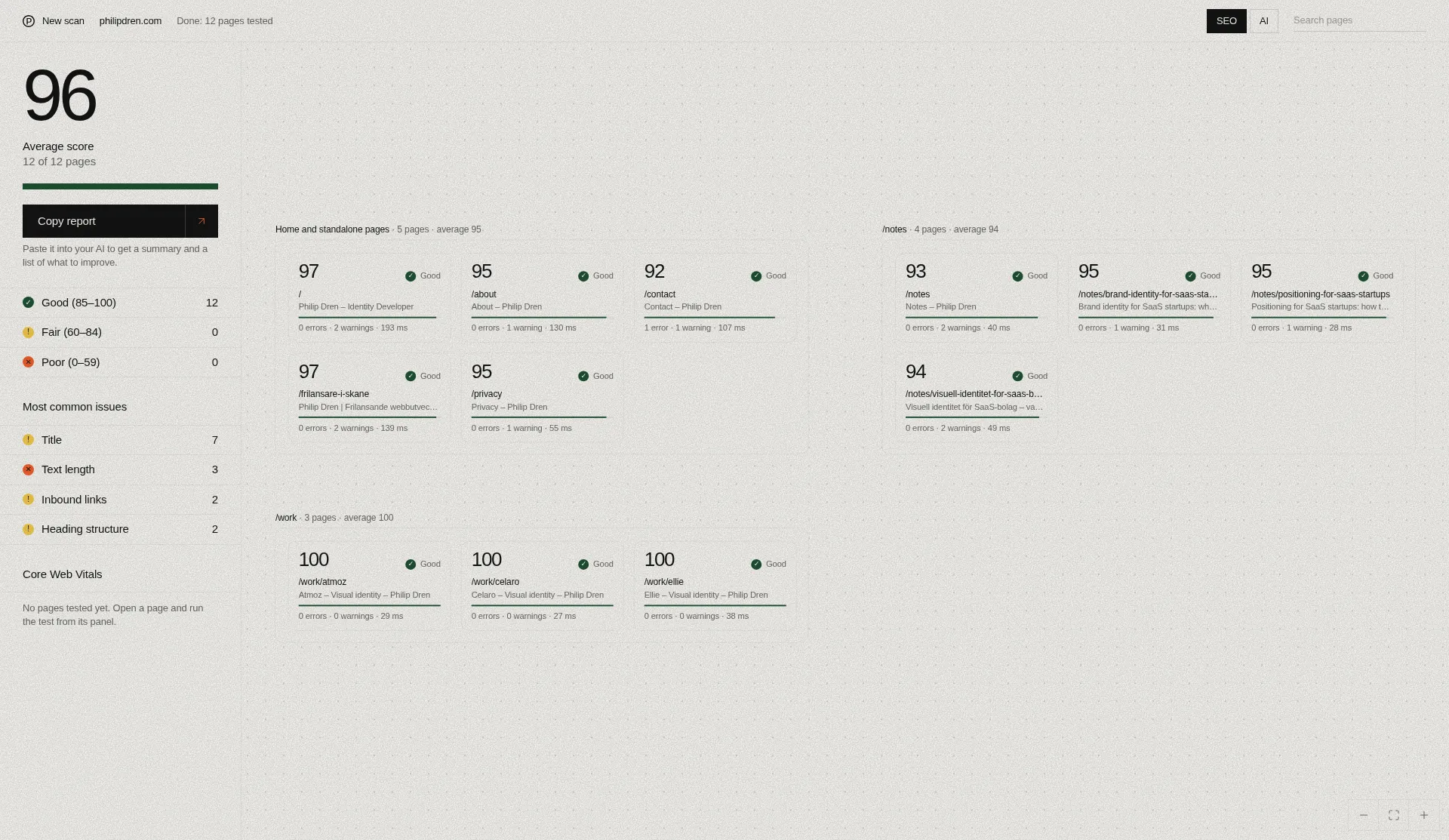
Enter a URL to see your pages on one canvas, tested in batches of 50, with SEO checks and a separate AI readiness score for each page.
How it works
Enter a URL
Paste your website address. The tool reads your robots.txt and sitemap to find pages. If there is no sitemap, it uses the links on your homepage.
Watch results appear
The tool tests the first 50 pages. Each page shows up on the canvas as soon as its test finishes. The tool also follows internal links to find pages that are not in your sitemap.
Explore, then load more
Look through the results, open any page for details, and load 50 more pages when you are ready. There is a one-minute cooldown between batches.
Canvas overview
Every tested page becomes a card on the canvas, color-coded by score. You can see the pages tested so far at a glance and look closer where you need to.
- Pan and zoom to move around the canvas
- Search for a specific page
- Filter by issue or by score band:
| Score band | Range |
|---|---|
| Good | 85–100 |
| Fair | 60–84 |
| Poor | 0–59 |
A side panel shows the average score and the most common issues.
Page details
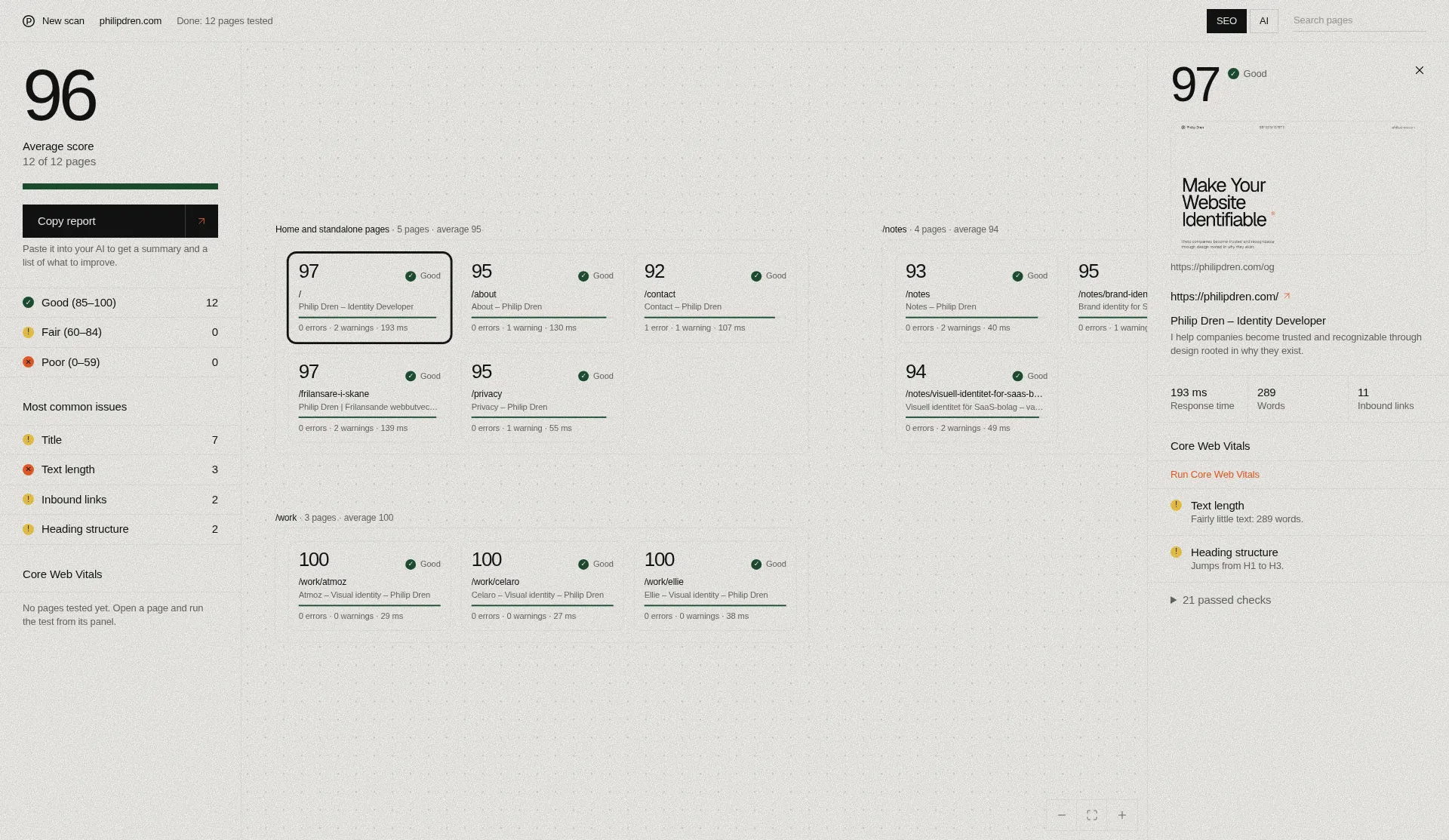
Open any card to see the details for that page:
- Score
- Title
- Meta description
- Open Graph image preview
- Response time
- Word count
- Inbound links
Issues are listed first and passed checks after them. Each one comes with a simple explanation.
SEO checks
Per page
- HTTP status
- HTTPS
- Indexing
- robots.txt
- Title
- Meta description
- Canonical
- H1
- Heading structure
- Text length
- Language
- URL format
- Response time
- Open Graph
- Structured data
- Alt text
- Mobile friendliness
Site-wide
- Duplicate titles
- Duplicate meta descriptions
- Broken internal and external links
- Redirect links
- Pages missing from the sitemap
- Orphan pages
- Click depth
Site-wide results are based on the pages tested so far. Pages are tested in batches and read as raw HTML, so these results may not cover every page on your site.
AI readiness
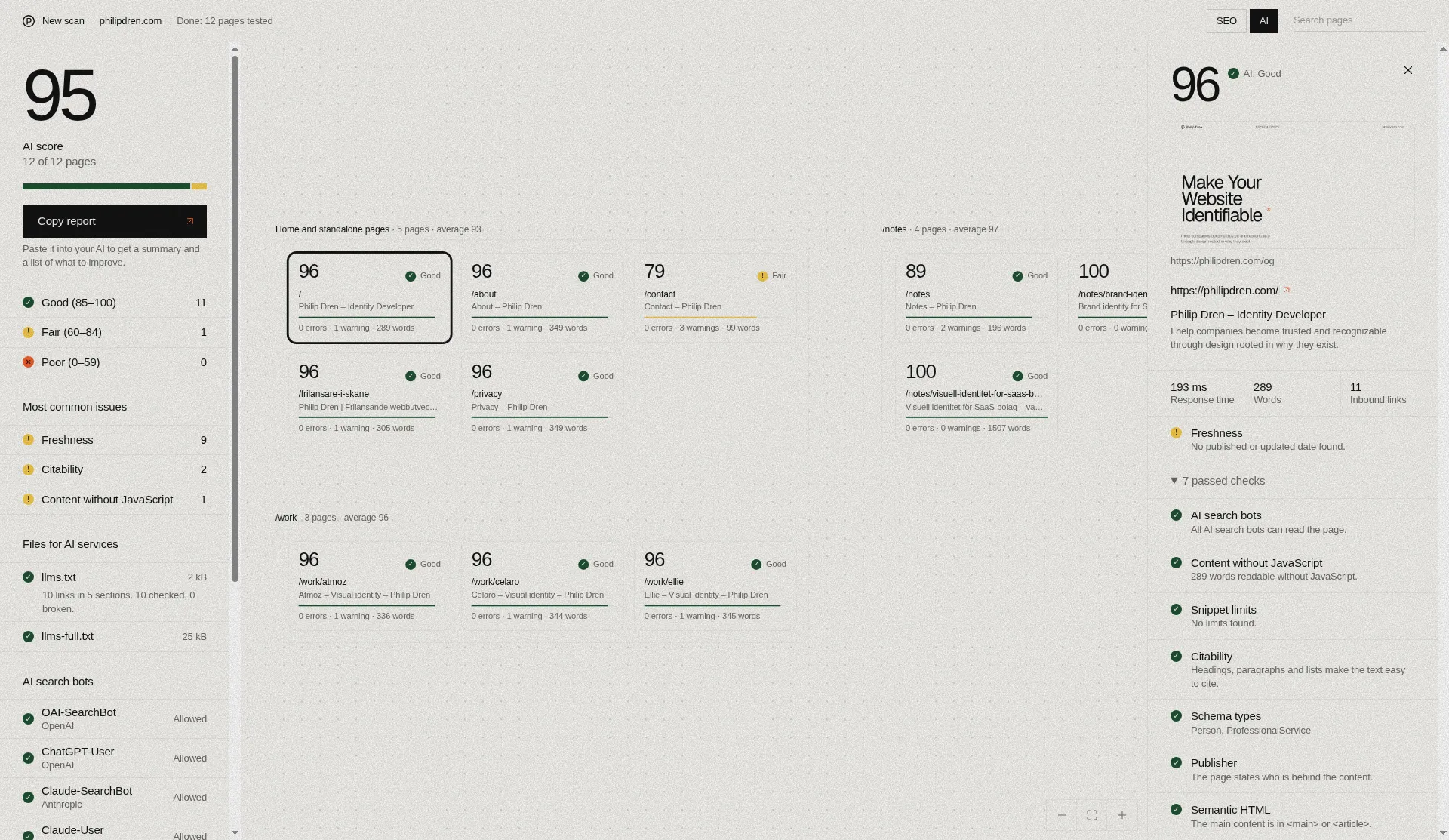
A separate score for how well AI services can read your pages.
Next to its SEO score, each page gets a separate AI readiness score for how well AI services can read that page. It does not measure whether AI services cite, show or rank your site.
Per page
- Schema types
- Publisher info
- Freshness
- Semantic HTML
- Snippet limits
- Content structure
Site level
- Whether llms.txt and llms-full.txt exist
- The structure of your llms.txt, plus a check of a sample of its links (not every link)
- AI bot access in robots.txt, in two groups:
| Bot group | Effect on the AI readiness score |
|---|---|
| AI search bots | Blocking them lowers the score |
| AI training bots | Blocking them is your choice. No deduction |
The full list of bots is in the FAQ below.
Bot access is checked in robots.txt only. The tool does not check whether a firewall blocks these bots.
Core Web Vitals
Click to run a Google PageSpeed test on demand for the page you have selected.
- LCP, INP and CLS from real Chrome visitors, when that data is available
- When it is not available, mobile lab data is shown instead, with TBT in place of INP
- The Lighthouse performance score
Two kinds of scores
The SEO score and AI readiness score are the tool’s own weighted scores. Core Web Vitals and the Lighthouse performance score come from Google. They are shown separately.
Copy report for your AI
One click copies the full report with AI instructions.
Paste it into any AI assistant to get:
- An understandable summary of the current situation
- What is good and what is bad
- A prioritized list of improvements
Saved scans
Completed scans are saved locally in your browser and listed on the tool’s home screen.
- Reopen a scan
- Load more pages into it
- Delete it
The latest 20 scans are kept. They are saved locally in your browser, not on servers.
FAQ
Are all pages tested at once?
No. The first 50 pages are tested, and each result appears as soon as that page finishes. You can then load 50 more at a time, with a one-minute cooldown between batches.
How are pages found?
The tool reads your robots.txt and sitemap, or uses your homepage links if there is no sitemap. It also follows internal links to find pages outside the sitemap. It may not find every page on your site.
Is the score the same as Google’s SEO score?
No. The SEO score and AI readiness score are the tool’s own weighted scores, not Google’s. Only the Core Web Vitals and the Lighthouse performance score come from Google.
Does the tool run JavaScript?
No. Pages are read as raw HTML without running JavaScript. If your site is fully rendered in the browser, results may be misleading.
Does the AI readiness score show whether AI services cite or recommend my site?
No. It measures how well AI services can read your pages. It says nothing about AI visibility, citations or rankings.
Does the bot access check confirm that AI bots can reach my site?
No. It checks only robots.txt. It does not check whether a firewall blocks access.
Why doesn’t blocking training bots lower my score?
Blocking training bots is treated as your choice, so there is no deduction. Blocking AI search bots does lower the AI readiness score.
Which bots are checked?
| Bot | Group | Blocking lowers score? |
|---|---|---|
| OAI-SearchBot | AI search | Yes |
| ChatGPT-User | AI search | Yes |
| Claude-SearchBot | AI search | Yes |
| Claude-User | AI search | Yes |
| PerplexityBot | AI search | Yes |
| GPTBot | AI training | No |
| ClaudeBot | AI training | No |
| Google-Extended | AI training | No |
| Applebot-Extended | AI training | No |
| CCBot | AI training | No |
Is real-visitor Core Web Vitals data always available?
No. LCP, INP and CLS from real Chrome visitors are shown when available. When they are not, mobile lab data is shown, with TBT instead of INP. TBT is a lab measurement, not real-user INP.
Will fixing the issues improve my rankings or AI visibility?
The tool makes no promises about rankings, AI visibility or citations.
Where are my scans saved?
Completed scans are saved locally in your browser, not on servers. The latest 20 are kept.
See your siteon one canvas
Enter your URL, see the first 50 pages appear, and load more when you are ready.
Check your site